

Description
Automate Google Tasks with Power Tools
Overview
The software is designed to streamline workflows centered around Google Workspace services, particularly Google Drive, Docs, Gmail, and PDF management. It enables users to automate repetitive tasks such as compressing files into ZIP format, creating or modifying Google Documents with custom paper sizes, and managing bulk email threads. The tool is especially useful for professionals handling large volumes of documents, emails, or digital assets across multiple projects. It supports advanced operations like splitting and merging PDFs, extracting text from binary files, and validating email addresses—ideal for administrative staff, content creators, and remote teams.
By leveraging the Google Apps Script Execution API hosted on Google Cloud, the application runs securely within the Google ecosystem without requiring local file storage. This ensures data privacy and reduces the risk of unauthorized access. The software is entirely free to use, removing cost barriers for individuals and small teams seeking automation tools. Real-world use cases include organizing digital archives, preparing print-ready envelopes, cleaning up email inboxes, and processing large document sets efficiently.
The developer, SoftPas, has positioned this tool as a lightweight, no-frills solution for Google-centric workflows. While specific company details are not provided, the focus on automation within Google’s suite suggests a targeted approach to solving common productivity bottlenecks.
Key Features & Capabilities
- Zip Files & Folders to Google Drive: Compress local files and folders directly into ZIP format and save them to Google Drive without manual upload.
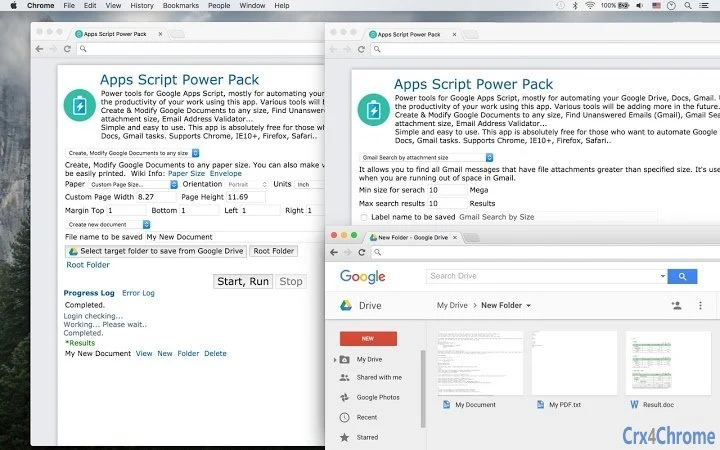
- Create & Modify Google Docs with Any Paper Size: Generate documents tailored to custom dimensions, including envelopes and specialized print formats.
- Find Unanswered Emails in Gmail: Identify email threads where the sender has not received a reply, helping users follow up efficiently.
- Gmail Search by Attachment Size: Locate messages with attachments exceeding a specified size, useful for managing storage limits.
- Bulk Email Management: Move, label, mark as read/unread, or archive up to 6,000 Gmail threads at once.
- PDF Manipulation Tools: Split and merge PDF files, extract text from PDFs and other office formats, and encrypt/decrypt protected documents.
- Email Address Validator: Verify the validity of email addresses in bulk to improve outreach accuracy.
- Text Extraction from Binary Files: Convert PDFs, DOCs, XLS, PPT, and ODT/ODS/ODP files into plain text for indexing or analysis.
These capabilities allow users to reduce manual effort across multiple workflows. For example, a project manager can automate the creation of client deliverables in custom document sizes, while an administrator can clean up a cluttered inbox by identifying and archiving outdated threads. The ability to process thousands of emails at once enhances efficiency in high-volume environments.
User Interface, Workflow & Performance
The application features a clean, task-oriented interface focused on accessibility and workflow efficiency. Navigation is structured around core functions, with clearly labeled buttons for each automation task. Users can initiate actions with minimal clicks, making it suitable for non-technical users. The workflow is linear: select a task, configure parameters, and execute—reducing the learning curve.
Since the tool operates via the Google Apps Script Execution API, it does not store data locally. This design enhances security and ensures that all processing occurs within Google’s infrastructure. The developer did not specify resource usage details, so performance may vary depending on internet speed, Google account load, and the complexity of the requested task.
Stability appears to be consistent for standard operations, as the tool relies on Google’s cloud-hosted services. However, exact CPU or RAM behavior was not provided. Users should expect typical performance patterns for cloud-based desktop utilities, with processing times dependent on task volume and network conditions.
Compatibility & System Requirements
The software is compatible with Windows, Mac, and Linux operating systems, making it accessible across major desktop platforms. It is available in version 1.0.0 and has an installation size of 2.5 MB, indicating a lightweight footprint. This small size suggests minimal impact on system resources during operation.
Exact system requirements were not listed. Users should ensure their device meets general standards for running modern web applications, including a stable internet connection and access to a Google account. Platform compatibility information is limited to the listed operating systems, with no mention of specific hardware or software prerequisites.
Pros and Cons
Pros
- Free to use with no hidden costs or subscriptions.
- Direct integration with Google Drive, Docs, and Gmail.
- Supports bulk processing of up to 6,000 Gmail threads.
- Lightweight at only 2.5 MB in size.
- Enables automation of complex tasks without coding.
- Secure execution via Google Cloud-hosted Apps Script API.
Cons
- No local file storage or offline functionality.
- Dependent on stable internet connection for all operations.
- Exact performance metrics and system requirements were not specified.
- Limited to Google Workspace services—no support for non-Google platforms.
- Requires a Google account for full functionality.
FAQ Section
Is the software free to use?
Yes, the software is completely free. There are no subscription fees, in-app purchases, or premium tiers.
Does it work offline?
No, the application requires an active internet connection to communicate with the Google Apps Script Execution API. It cannot function offline.
What operating systems are supported?
The software supports Windows, Mac, and Linux operating systems.
Is my data secure when using this tool?
Yes, the tool uses the Google Apps Script Execution API hosted on Google Cloud, which ensures data privacy. No files are stored locally, and all processing occurs within Google’s secure infrastructure.
How often are updates released?
Updates are released as needed. The current version is 1.0.0, and the developer has not specified a fixed update schedule.
Final Thoughts + CTA
This desktop application delivers a powerful set of automation tools tailored for users deeply embedded in the Google Workspace ecosystem. Its ability to manage bulk Gmail operations, manipulate PDFs, and automate document creation makes it a valuable asset for professionals seeking to reduce manual workload. While it lacks offline functionality and detailed system specs, its lightweight design, free access, and seamless integration with Google services make it a compelling choice.
Teams and individuals who rely on Google Drive, Docs, and Gmail will benefit most from this tool. Whether organizing digital files, cleaning up inboxes, or preparing print-ready documents, the software enhances productivity without requiring technical expertise.
Download Automate Google Tasks with Power Tools now.
Guides & Tutorials for Apps Script Power Pack App for Chrome
How to install Apps Script Power Pack App for Chrome
- Click the Preview / Download button above.
- Once redirected, accept the terms and click Install.
- Wait for the Apps Script Power Pack App for Chrome download to finish on your device.
How to use Apps Script Power Pack App for Chrome
This software is primarily used for its core features described above. Open the app after installation to explore its capabilities.
User Reviews for Apps Script Power Pack App for Chrome 0
No reviews found





